

Oracle HCM
HCM Professional Activity Centre vs Current Ways of Working
The HCM Professional Activity Centre provides HR professionals with a single, role-based workspace for managing day-to-day activities. While the Oracle HCM Home Page provides access to all areas of the system, the Activity Centre helps reduce navigation and brings work together in one place, making it easier to manage priorities and complete tasks efficiently.
Quick answer
The HCM Professional Activity Centre provides HR professionals with a single, role-based workspace for managing day-to-day activities. While the Oracle HCM Home Page provides access to all areas of the system, the Activity Centre helps reduce navigation and brings work together in one place, making it easier to manage priorities and complete tasks efficiently.
Visual comparison
Current ways of working vs HCM Professional Activity Centre
Current ways of working
HCM Professional Activity Centre
| Area | Current ways of working (multiple pages) | Using the HCM Professional Activity Centre |
|---|---|---|
| Overall experience | HR Professionals navigate between the Home Page, Person Details, Quick Actions, other application areas, and worker records, frequently returning to the Home Page to launch additional tasks. | A single HR workspace that brings together worker search, employee information and transactions in one place. |
| Finding employees | Search using name, person number, job title, or email address performed on each app, card or quick action and may require exact details. | Search using name, person number, job title, or email address in one place, not having to re-enter detail on each action. |
| Managing search results | Limited ability to reuse searches and often requires repeating search activities. | Save, share, and reuse filters. Export results directly to Excel. |
| Viewing employee information | Information spread across multiple apps and quick actions requiring navigation between areas. | Unified employee profile showing employment details, absence, compensation, benefits, documents, and employment history in one location. |
| Understanding worker history | Multiple screens may need to be reviewed to understand a worker's employment journey. | Employment timeline and configurable insight cards provide a consolidated view of a worker's history and key information. |
| Completing HR transactions | Navigate to specific quick actions, menus, or modules to perform updates. | Launch common HR actions directly from the worker profile. |
| Assignment changes | Search for employee, navigate to appropriate task, complete transaction, then return to another area if additional updates are needed. | Assignment changes, salary changes, and location updates can be initiated directly from the employee record. |
| Working across HCM modules | Move between Payroll, Recruiting, Workforce Management, and other areas through separate navigation paths and menus. | Access related actions and links from the same workspace, reducing navigation and clicks. |
| Accessing worker insights | HR Professionals manually review records, reports, or dashboards to gather information. | Insight cards surface important information, such as salary, performance ratings, and promotions. |
| Reporting and analysis | Reporting often requires running reports or navigating to reporting tools. | AI-assisted queries and export functionality provide faster access to information and analysis. |
| Decision making | Reactive approach requiring manual review of information from multiple sources. | Oracle's future vision includes AI-driven insights, proactive recommendations, risk identification, and compliance monitoring. |
| Productivity | Multiple clicks, repeated navigation, and frequent movement between applications and pages. | Reduced navigation, fewer clicks, and a more streamlined end-to-end HR process. |
Why it matters
Using the Home Page is like having a map of the entire Oracle HCM system. It provides access to everything but often requires navigation between several apps and pages to complete a process.
The HCM Professional Activity Centre acts more like a personalised HR workspace. It brings together tasks, alerts, approvals, and workforce actions into a single location, helping HR professionals focus on what needs attention now rather than spending time searching for where to perform a task.
Why use the HCM Professional Activity Centre?
The HCM Professional Activity Centre is designed to help HR Professionals work more efficiently by bringing employee information, HR actions, and AI-powered insights together in one place.
- Find employee information quickly using enhanced search capabilities.
- Access a complete view of employee records, including employment, absence, compensation, benefits, and documents.
- Complete HR transactions directly from the employee's record.
- Reduce time spent navigating between multiple pages and systems.
- Support managers and employees more effectively with faster access to information and actions.
Visual storyboard
A day in the life of an HR professional
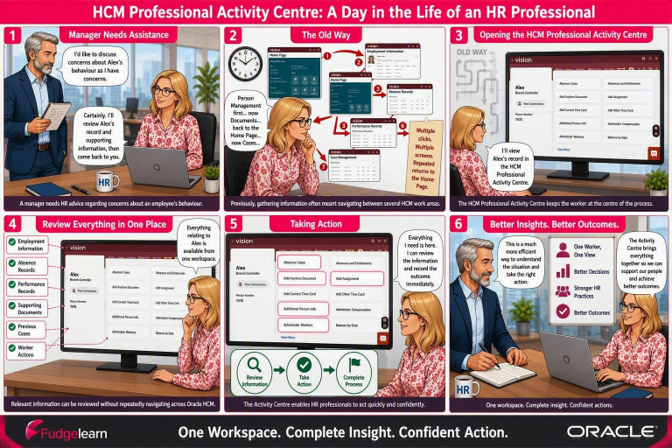
Oracle HCM workspace
Getting to the HCM Professional Activity Centre
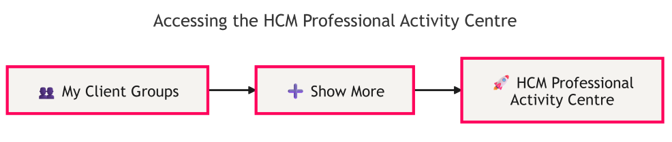
Workspace preview
The HCM Professional Activity Centre look and feel
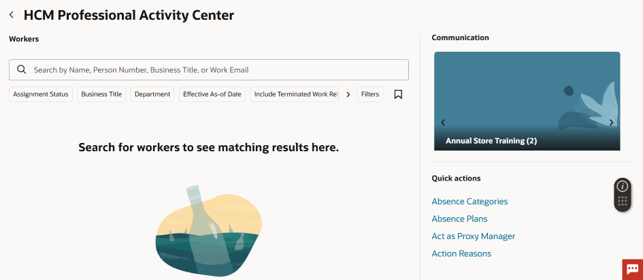
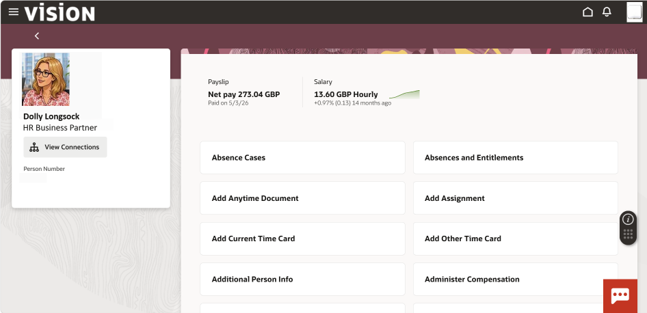
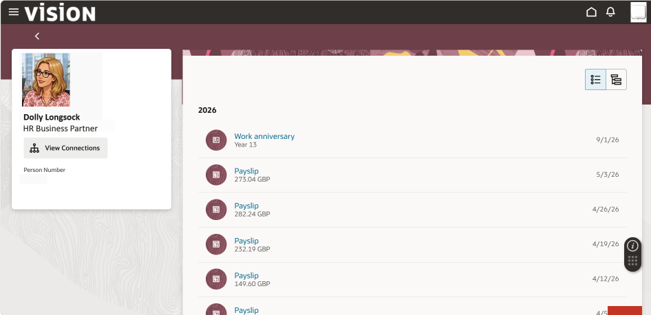
Before and after
Summary of capability and adoption impact
| Before | After |
|---|---|
| Navigation-led support | Role-based capability development |
| Showing users where to find tasks | Building confidence to prioritise and act |
| Multiple applications and pages | Single role-based workspace |
| Finding transactions | Completing transactions |
| Reactive process execution | Proactive workload management |
| System-centred instruction | Role-based capability and confident action |
In essence, the focus shifts from knowing where to click to building the capability and confidence to complete HR work. Role-based guidance, practical activities and ongoing support should help HR professionals use the HCM Professional Activity Centre in their day-to-day roles.
Your questions answered
Frequently asked questions
What is the HCM Professional Activity Centre?
The HCM Professional Activity Centre is a role-based workspace for HR professionals. It brings worker search, employee information and HR actions together to help users manage day-to-day work with less navigation between pages.
How does it differ from the Oracle HCM Home Page?
The Home Page provides access to different areas of Oracle HCM. The Activity Centre brings related HR work together in one workspace, reducing the need to return to the Home Page to launch additional tasks.
How can it help HR professionals work more efficiently?
It brings employee information and related actions closer together. This can reduce repeated searches and movement between pages, helping HR professionals spend less time finding tasks and more time completing them.
How should we build HR capability for the Activity Centre?
Start with the work each HR role needs to complete, rather than navigation alone. Review guidance, screenshots and practical activities so people can practise searching, reviewing information and completing relevant HR actions. Identify where additional support is needed to build confidence and readiness.
How can the Capability and Adoption Impact Tracker help?
The tracker supports a structured review of capability support materials, ownership and updates. It includes an overall status dashboard, a detailed activity tracker, a capability support asset update summary, accessibility and inclusion checks, a go-live readiness checklist and a RAG status summary.
Downloadable resource
Get the HCM Professional Activity Centre Capability and Adoption Impact Tracker
Use the practical tracker to review role-based capability support, assign owners, monitor updates and assess go-live readiness for the HCM Professional Activity Centre.
- Overall status dashboard
- Detailed activity tracker
- Capability support asset update summary
- Accessibility and inclusion checks
- Go-live readiness checklist
- RAG status summary